SCIM 2.0 Provisioning
Fudo Enterprise can act as a SCIM 2.0 Service Provider. It exposes a SCIM endpoint that an external identity provider (IdP) uses to provision and manage user identities and group membership in Fudo Enterprise. Fudo Enterprise only receives provisioning requests from the IdP - it never initiates them.
SCIM automates the user identity lifecycle (creating, updating, disabling, and re-enabling users) and group membership. It does not manage other Fudo Enterprise objects, such as servers, accounts, safes, password vaults, session policies, or authentication flows. Those remain configured locally in Fudo Enterprise.
Note
When OpenID Connect (OIDC) login is also used for SCIM-provisioned users, configure SCIM and OIDC on the same IdP application so that both integrations refer to the same set of users and identities are used consistently.
Managing Access to the SCIM Configuration
SCIM provisioning of users and groups is performed internally by the built-in scim_manager system user, which Fudo Enterprise creates automatically and which already has the privileges required to create, update, block, and re-enable SCIM-managed users and groups. You do not need to create a user or assign any privileges for provisioning itself to work.
You only need to configure a role if you want to allow a user other than the superadmin to manage the SCIM configuration - that is, to view its state, enable or disable provisioning, and rotate the API key. Grant such a user a role with the SCIM privileges from the User Sources group:
scim-read- view the SCIM configuration state;scim-modify- configure SCIM provisioning, including enabling or disabling it and rotating the API key.
Note
This role grants access to the SCIM configuration only (scim-modify is required to configure SCIM provisioning). It does not affect how users and groups are provisioned - that is always handled internally by the scim_manager system user.
Configuring SCIM Provisioning
To connect an identity provider to Fudo Enterprise, provide the IdP with the Fudo Enterprise SCIM Base URL and the API key that serves as the SCIM bearer token.
Select > .
Go to the SCIM Provisioning tab.
Click . Fudo Enterprise generates the Base URL and the API key.
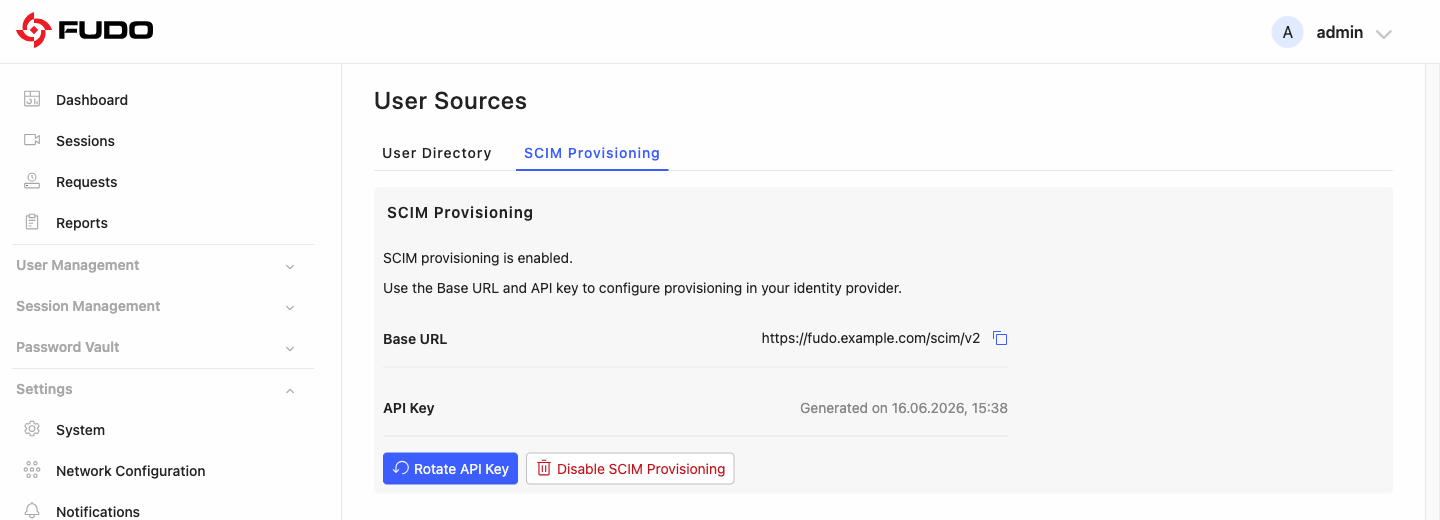
Copy the Base URL - it is the SCIM endpoint address of this Fudo Enterprise instance (for example,
https://<fudo-address>/scim/v2).Copy the API key.
Warning
The API key is shown only once, at the moment it is generated. Copy it immediately and store it securely. If the key is lost, rotate it to generate a new one.
Configure your identity provider with these values, as described in Configuring the identity provider. No separate OAuth flow is required.
Configuring the Identity Provider
Note
The exact steps depend on the identity provider. The following procedure provides general guidance typical for SCIM 2.0-compliant identity providers.
In the identity provider, add or create an application that supports SCIM 2.0 provisioning.
In the application’s provisioning settings, set the SCIM endpoint (named SCIM connector base URL, Tenant URL, or similar) to the Fudo Enterprise Base URL.
Set the authentication method to a bearer token (HTTP header) and paste the Fudo Enterprise API key as the token (also called the Secret Token). Use the provider’s Test connection function to verify the setup.
Review the attribute mappings so that the provider sends at least
userName,name,displayName, the primaryemailsandphoneNumbersvalues,active, andexternalId. TheexternalIdis the correlation key (see Attribute mapping).Set the provisioning scope to the assigned users and groups, and enable provisioning.
Assign users and groups to the application to provision them in Fudo Enterprise. Some providers require an explicit step to provision groups (for example, the Okta Push Groups feature).
Note
In Okta, assigned users are provisioned automatically, while groups must be pushed explicitly with Push Groups.
Microsoft Entra ID requires an Entra ID P1 (or higher) license. Changes are applied with Provision on demand or on the automatic (approximately 40-minute) cycle; deletions are applied only on the automatic cycle.
Field names and navigation differ between providers and may change over time. Always follow the current SCIM 2.0 setup documentation of your identity provider (Okta or Microsoft Entra ID).
Rotating the API Key
You can rotate the API key at any time, for example as part of credential hygiene or if the key may have been exposed.
Select > > SCIM Provisioning.
Click and confirm.
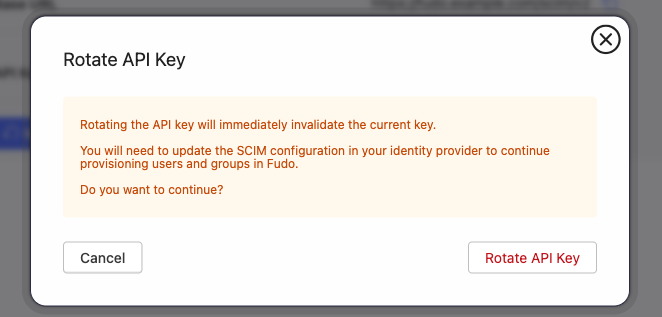
Warning
Rotating the API key immediately invalidates the current key. Update the SCIM configuration in your identity provider with the new key to continue provisioning users and groups in Fudo Enterprise.
Disabling SCIM Provisioning
To stop accepting SCIM requests, click on the SCIM Provisioning tab. After disabling:
the API key stops working and the IdP can no longer provision changes;
existing SCIM-managed users and groups remain in Fudo Enterprise but become locally managed and can be edited by an administrator.
SCIM-Managed Account Behavior
After SCIM provisioning is enabled, the identity provider manages selected user accounts in Fudo Enterprise. Users assigned to the application on the IdP side are automatically created in Fudo Enterprise and marked as managed by SCIM.
During synchronization, Fudo Enterprise updates mapped user attributes, such as the login, email address, or display name. Fields managed by SCIM are treated as data coming from the IdP and cannot be edited locally in Fudo Enterprise - the system enforces this.
If a user is deactivated in the IdP or removed from the provisioning scope, Fudo Enterprise blocks the user account. Any active user sessions are terminated, while session history, audit data, and previous associations are preserved.
Note
Fudo Enterprise identifies records by
externalId. BothexternalIdanduserNameare unique: aPOSTrequest that reuses theexternalIdoruserNameof an existing user is rejected with409 Conflict(scimType: uniqueness). Accounts are created withPOST; existing accounts are updated, and deactivated accounts re-enabled, withPATCH.Identity providers query Fudo Enterprise before writing and determine on that basis whether to create or update a record. Fudo Enterprise performs no de-duplication of its own; matching an incoming identity to an existing record is handled by the identity provider.
Attribute Mapping
The identity provider is authoritative for all mapped identity attributes. In Fudo Enterprise, these fields are read-only for SCIM-managed users and are updated only through SCIM.
SCIM attribute (from IdP) |
Fudo Enterprise user field |
Notes |
|---|---|---|
|
Internal correlation key |
Primary correlation key. Not displayed and not editable. Used to match the same identity across creation, update, blocking, and re-enabling. |
|
Login / username |
Required and unique. Read-only. If the |
|
Name components |
Read-only. |
|
Full name |
Read-only. The sole source of the full name. |
|
Only the entry marked |
|
|
Phone |
Only the entry marked |
|
Account state |
Drives blocking and unblocking (see Blocking model). |
|
Group membership |
Read-only on the user resource. Membership is managed through the |
Attributes That Are Not Supported
Fudo Enterprise implements the SCIM 2.0 core User and Group schemas only. Attributes outside the mapping table above are accepted and ignored: the request succeeds, no error is returned, and the values are not stored in Fudo Enterprise.
Ignored attributes include:
organization,title,roles, andentitlements;name.formatted,name.middleName,name.honorificPrefix, andname.honorificSuffix;the whole Enterprise User extension (
urn:ietf:params:scim:schemas:extension:enterprise:2.0:User), includingdepartment,employeeNumber, andmanager.
Note
Once SCIM provisioning is enabled, the instance publishes the definitions of the supported schemas at <Base URL>/Schemas - for example https://<fudo-address>/scim/v2/Schemas.
The endpoint requires no bearer token and returns the list of attributes of the User and Group resources supported by that Fudo Enterprise version.
Example Payloads
The requests below use the Base URL and API key from the SCIM Provisioning tab; the API key is sent as a bearer token (Authorization: Bearer <API key>) and the content type is application/scim+json.
Creating a user with every supported attribute - POST <Base URL>/Users:
{
  "schemas": ["urn:ietf:params:scim:schemas:core:2.0:User"],
  "externalId": "12345-abcde",
  "userName": "john.doe@example.com",
  "name": {
    "givenName": "John",
    "familyName": "Doe"
  },
  "displayName": "John Doe",
  "emails": [
    { "value": "john.doe@example.com", "type": "work", "primary": true }
  ],
  "phoneNumbers": [
    { "value": "+49-555-0100", "type": "work", "primary": true }
  ],
  "active": true
}
This creates an active Fudo Enterprise user whose login is john.doe (the part before the @) and whose full name is John Doe. The response returns the assigned Fudo Enterprise user id, which is the value used to manage group membership.
Adding that user to an existing group - PATCH <Base URL>/Groups/<group id>:
{
  "schemas": ["urn:ietf:params:scim:api:messages:2.0:PatchOp"],
  "Operations": [
    {
      "op": "add",
      "path": "members",
      "value": [ { "value": "<user id>" } ]
    }
  ]
}
Removing that user from the group - PATCH <Base URL>/Groups/<group id>:
{
  "schemas": ["urn:ietf:params:scim:api:messages:2.0:PatchOp"],
  "Operations": [
    {
      "op": "remove",
      "path": "members[value eq \"<user id>\"]"
    }
  ]
}
Deactivating a user - PATCH <Base URL>/Users/<user id>. The same request with "value": true re-enables the user:
{
  "schemas": ["urn:ietf:params:scim:api:messages:2.0:PatchOp"],
  "Operations": [
    {
      "op": "replace",
      "path": "active",
      "value": false
    }
  ]
}
Note
These requests are issued by the identity provider during normal operation. The examples show the payload structure and can be used to verify connectivity while the integration is being set up.
Restrictions On Scim-Managed Objects
Once a user or group is managed by SCIM, the identity provider is its source of truth. In Fudo Enterprise you therefore cannot:
edit the identity data of a SCIM-managed user or group (name, email, phone, or the group name);
change a SCIM-managed group’s membership - the assign/remove user controls are disabled, and local Fudo Enterprise users cannot be added to it;
create or delete SCIM-managed users and groups manually.
You can still configure the following locally, because SCIM does not touch it:
safe access, account access, and object rights for the SCIM-managed user or group;
roles, the Fudo domain, and authentication methods of a SCIM-managed user.
These local settings are preserved when the identity provider updates a group, for example after a rename or a membership change. Roles are assigned to users directly in Fudo Enterprise; unlike User Directory groups, Fudo Enterprise groups (including SCIM-managed groups) do not grant roles through a group-to-role mapping.
The separation applies in both directions. The identity provider manages identity attributes and group membership; the following are set in Fudo Enterprise only and have no SCIM representation:
roles (see Attributes that are not supported for the ignored
rolesattribute);the Fudo domain;
safe access, account access, and object rights;
authentication methods.
Provisioning is also confined to SCIM-managed objects. The identity provider manages the users and groups that SCIM created, and SCIM-managed users belong to SCIM-managed groups only. Accounts and groups created locally in Fudo Enterprise remain outside its scope.
Note
When a group is deleted in the identity provider, Fudo Enterprise removes the group and its members lose the access that the group granted. Access granted by other means is not affected.
Blocking Model
Fudo Enterprise tracks two independent block states for a SCIM-managed user; clearing one does not clear the other:
Blocked by SCIM- applied when the identity provider deactivates the user (active=false).Blocked locally- applied when an administrator blocks the user manually in Fudo Enterprise. A local block requires a reason and is audited; an emergency local block of a SCIM-managed user is allowed.
The Blocked by SCIM state takes precedence: while it is in effect, the user stays blocked even if the local block is removed. The user is unblocked only when the identity provider reactivates them (active=true).
Note
If the identity provider sends a delete request instead of a deactivation, Fudo Enterprise removes the user rather than blocking them. In practice, Okta and Microsoft Entra ID always deactivate users (active=false) rather than delete them.
The Managed by column shows the source of each object: SCIM, Fudo (local), or User directory. A SCIM-managed user also displays a Managed externally (SCIM) indicator on its details view.
Authentication with OIDC
SCIM-provisioned users typically sign in through OIDC, while SCIM remains authoritative for identity data. OIDC only authenticates the user and does not overwrite SCIM-managed attributes. SCIM-provisioned users can also be assigned other Fudo Enterprise authentication methods, such as a password or an API key.
OIDC authentication and SCIM provisioning are independent mechanisms: Fudo Enterprise does not require a user to be SCIM-provisioned in order to sign in through OIDC. Any Fudo Enterprise user whose identity matches the OIDC login - whether created by SCIM or added manually - can sign in. For SCIM-managed users, SCIM remains authoritative for their identity attributes regardless of the login method.
Auditing
Fudo Enterprise records every SCIM operation in the events log, capturing who performed it, what changed, and when. Provisioning changes received from the identity provider are recorded under the built-in scim_manager system user, which keeps SCIM activity clearly distinguishable from local administrator actions. The events log can be exported to a SIEM over syslog.
Related topics: