External authentication
Some of the authentication methods, require defining connections to external authentication servers. These are:
Authentication servers configuration page
Authentication servers configuration page enables adding new and editing existing authentication servers.
To open the authentication servers configuration page, select > .
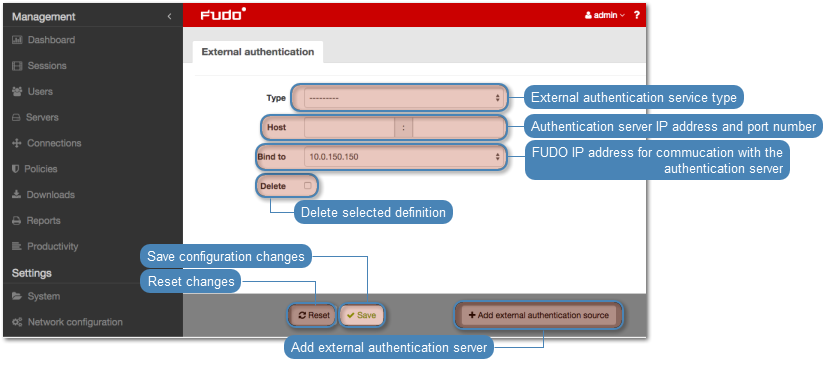
Adding a new external authentication server
To add an external authentication server, proceed as follows.
- Select > .
- Click .
- Select authentication service type.
- Provide configuration parameters depending on selected authentication system type.
| Parameter | Description |
|---|---|
| CERB | |
| Host | Server’s IP address. |
| Port | Port used to establish connections with given server. |
| Bind address | IP address used for sending requests to given host. |
| Secret | Secret used to establish server connection. |
| Service | CERB service used for authenticating Fudo PAM users. |
| RADIUS | |
| Host | Server’s IP address. |
| Port | Port used to establish connections with given server. |
| Bind address | IP address used for sending requests to given host. |
| Secret | Secret used to establish server connection. |
| NAS ID | RADIUS server NAS-Identifier parameter. |
| LDAP | |
| Host | Server’s IP address. |
| Port | Port used to establish connections with given server. |
| Bind address | IP address used for sending requests to given host. |
| User DN template | Template containing a path which will be used to create queries to LDAP server. |
| Active Directory | |
| Host | Server’s IP address. |
| Port | Port used to establish connections with given server. |
| Bind address | IP address used for sending requests to given host. |
| Domain | Domain which will be used for authenticating users in Active Directory. |
Note
Labeled IP addresses
In case of cluster configuration, select a labeled IP address from the Bind address drop-down list and make sure that other nodes have IP addresses assigned to this label. For more information refer to the Labeled IP addresses topic.
- Click .
Editing authentication server definition
To edit an authorization server definition, proceed as follows.
- Select > .
- Find the server definition and change its configuration as desired.
- Click .
Deleting authentication server definition
To delete authentication server definition, proceed as follows.
- Select > .
- Find desired server definition and select Delete.
- Click .
Related topics: