Legacy Session Cookie
Starting with version 6.3, Fudo Enterprise keeps the session identifier of the Fudo Admin Panel and the User Access Gateway in the __Host-sessionid cookie instead of sessionid. The browser accepts a cookie with the __Host- prefix only from the host that set it and only over HTTPS, so another host in the same domain cannot plant or overwrite it.
If your scripts, integrations or security rules (for example, on a WAF or a reverse proxy) rely on the sessionid name, you can temporarily enable the Use legacy sessionid option. With the option enabled, Fudo Enterprise also sends the session identifier in the sessionid cookie and accepts that cookie when a request does not contain __Host-sessionid. The option is disabled by default, also after an upgrade.
Note
Integrations that authenticate with the Authorization header, using an API key or a session identifier, are not affected by the cookie name change.
Warning
The sessionid cookie is not protected against being planted from another host in the same domain. Enable the option only for the time needed to update your integrations. The option is under review and may be removed in a future version of Fudo Enterprise.
Enabling the Legacy Session Cookie
To enable the legacy session cookie, proceed as follows.
Select > .
Go to the General tab.
Select the Use legacy sessionid option in the Maintenance and Supervision section.
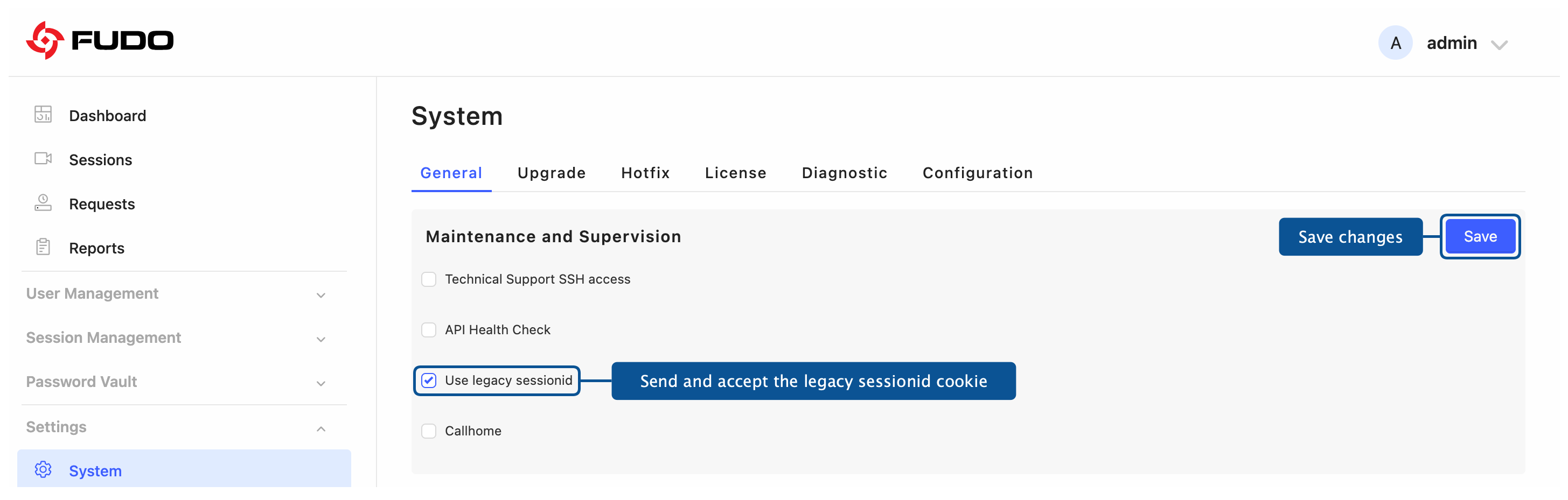
Click .
Restart Fudo Enterprise.
Note
The change takes effect only after a system restart. After saving, the section displays a message with a link that restarts the system. For more information, see System Reboot.
In a cluster, the option is not replicated between nodes. Enable it and restart Fudo Enterprise on each node separately.
Related topics: